Free Games
 How to play Sudoku
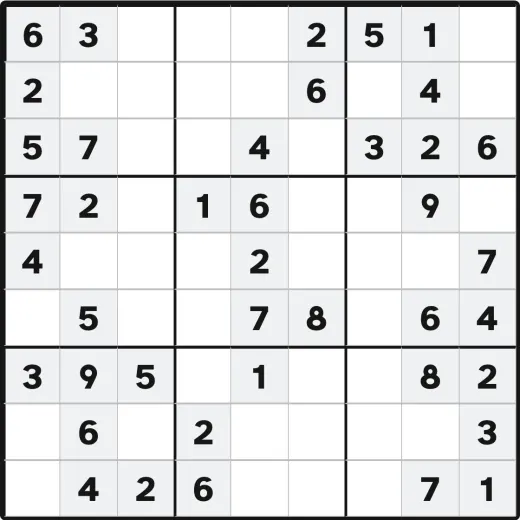
Sudoku is a number puzzle played on a grid of nine rows and nine columns, divided into nine smaller three-by-three boxes. Some squares already have numbers in them. Those are your clues. You fill in every empty square so that:
- each row contains the numbers 1 to 9, with no repeats;
- each column contains the numbers 1 to 9, with no repeats;
- each three-by-three box contains the numbers 1 to 9, with no repeats.
There is no math or adding up, only placing each number where it belongs. To play here, tap or click an empty square to select it, then tap a number on the number pad below the board (or press a number key on your keyboard). To remove a number, select the square and press Erase. The clue numbers that came with the puzzle cannot be changed.
Why this Sudoku is easy to play
Large, high-contrast numbers
The digits are big and bold by default, and you can make them even bigger with the A− and A+ buttons in the Text size panel. Tap the round button in the lower corner of the screen to open it. Prefer crisp black on white? Turn on High contrast. Whatever you choose is saved automatically, so the site looks the way you like it every time you visit.
Conflicts are marked
A number that conflicts with another in its row, column or box gets a red mark, so you can spot it and fix it.
Stuck on a square
Stuck on a tricky square? Press the large Hint button. Instead of just giving you an answer, it highlights the next square you can safely solve and tells you why, for example “this square can only be a 7.” Press it again to fill that square in. Hints are unlimited, and over time they help you learn the patterns yourself.
Always an Undo
Changed your mind? The Undo button steps back through your moves one at a time, as many times as you need.
Play with a keyboard or screen reader
You don’t need a mouse. Use the arrow keys to move around the grid, the number keys to fill squares, Backspace to clear, H for a hint and U to undo. Each square announces its position and contents for screen-reader users, and every change is read aloud.
Frequently asked questions
- Is this Sudoku really free?
- Yes. Every puzzle is completely free to play, with no sign-up and no email required. There are no pop-ups and nothing that sits over the game. To keep the site free I may show a few small, clearly-marked ads off to the side.
- Is there a timer?
- No. Nothing counts time, so you can stop in the middle of a puzzle and think as long as you need.
- What if I get stuck?
- Press the big orange Hint button. It highlights the next square you can safely fill and explains why. You can use it as many times as you like, and there is always an Undo button if you change your mind.
- Can I make the numbers bigger?
- Yes. Use the A− and A+ buttons at the very top of the page to make all text and numbers larger or smaller, and the High contrast button to sharpen everything to black on white. Your choice is remembered for next time.
- Can I play without a mouse?
- Yes. You can play entirely with the keyboard: use the arrow keys to move between squares, the number keys 1–9 to fill them in, Backspace to clear, H for a hint, and U to undo.
- Will my puzzle always have an answer?
- Yes. Every puzzle is generated with exactly one correct solution, so it can be finished with logic alone and you never have to guess.
Explore our full collection of free brain games and logic puzzles for seniors, or solve on paper with our large-print printable puzzles.